
SLURM advanced guide
Job array
Section titled “Job array”Job arrays offer a mechanism for submitting and managing collections of similar jobs quickly and easily; job arrays with millions of tasks can be submitted in milliseconds (subject to configured size limits). All jobs must have the same initial options (e.g. size, time limit, etc.), however it is possible to change some of these options after the job has begun execution using the scontrol command specifying the JobID of the array or individual ArrayJobID.
Full documentation: https://slurm.schedmd.com/job_array.html
Possibility:
#SBATCH --array=1,2,4,8#SBATCH --array=0,100:5 # equivalent to 5,10,15,20...#SBATCH --array=1-50000%200 # 200 jobs max at the timeExample 1: Deal with a lot of files
Section titled “Example 1: Deal with a lot of files”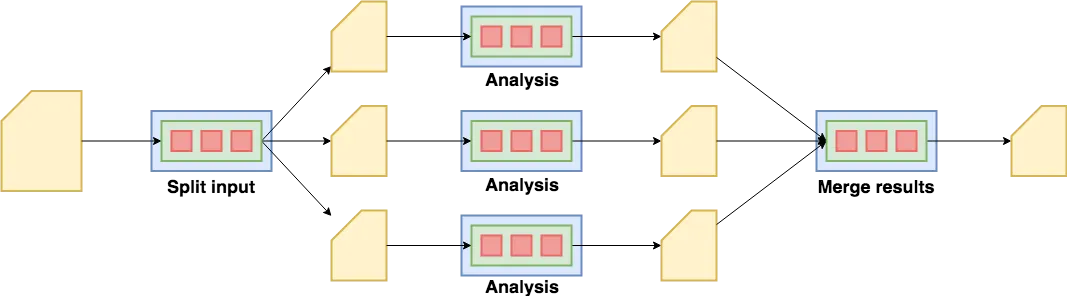
#!/bin/bash#SBATCH --array=0-29  # 30 jobs for 30 fastq files
INPUTS=(../fastqc/*.fq.gz)srun fastqc ${INPUTS[$SLURM_ARRAY_TASK_ID]}
Example 2: Deal with a lot of parameters
Section titled “Example 2: Deal with a lot of parameters”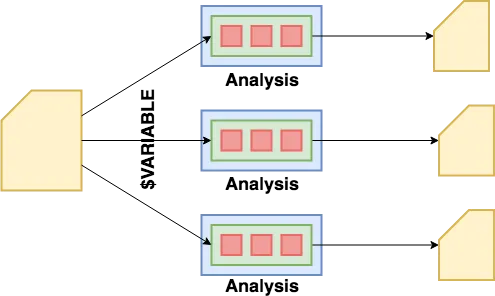
#!/bin/bash#SBATCH --array=0-4  # 5 jobs for 5 different parameters
PARAMS=(1 3 5 7 9)srun a_software ${PARAMS[$SLURM_ARRAY_TASK_ID]} a_file.ext
Job dependency
Section titled “Job dependency”For example, there is a dependency between the fastqc result and multiqc
fastqc.sh
#!/bin/bash#SBATCH --array=0-29  # 30 jobs
INPUTS=(../fastqc/*.fq.gz)fastqc ${INPUTS[$SLURM_ARRAY_TASK_ID]}$ sbatch fastqc.shSubmitted batch job 3161045multiqc.sh
#!/bin/bashmultiqc .sbatch --dependency=afterok:3161045 multiqc.shntasks
Section titled “ntasks”--nodes/-N: number of nodes (default is 1)--ntasks/-n: number of tasks (default is 1)
$ srun hostnamecpu-node-1$ srun --ntasks 2 hostnamecpu-node-1cpu-node-1$ srun --nodes 2 --ntasks 2 hostnamecpu-node-1cpu-node-2Example:
#!/bin/bash#SBATCH --ntasks=3
INPUTS=(../fastqc/*.fq.gz)for INPUT in "${INPUTS[@]}"; do     srun --ntasks=1 fastqc $INPUT &done
waitsrun --ntasks=1 multiqc .--ntasks=<number>, -n
Declaration of the number of parallel tasks (default 1)
For srun: Specify the number of tasks to run. Request that srun allocate resources for ntasks tasks. The default is one task per node, but note that the –cpus-per-task option will change this default. This option applies to job and step allocations.
For sbatch: sbatch does not launch tasks, it requests an allocation of resources and submits a batch script. This option advises the Slurm controller that job steps run within the allocation will launch a maximum of number tasks and to provide for sufficient resources. The default is one task per node, but note that the --cpus-per-task option will change this default.
--cpus-per-task=<ncpus>, --cpus, ``-c
Request a number of CPUs par tasks (default 1) (Cf ntask)
--nodes=<minnodes[-maxnodes]>, -N
Request that a minimum of minnodes nodes be allocated to this job (Cf ntask)
--ntasks vs --cpus-per-task
If it’s still confusing, please have a look at this thread of discussion: here
Hyperthreading
Section titled “Hyperthreading”Since may 2025, we have disabled the hyperthreading by default on our nodes.
As a consequence, the number of appararent CPU available is divided by two BUT according to our benchmark, the processing time of a job is divided by two for the CPU intensive jobs.
Enable hyperthreading
Section titled “Enable hyperthreading”For some case, you may want to enable hyperthreading.
For example, if you are running a lot of I/O bound jobs, you may want to enable hyperthreading to increase the number of jobs that can run concurrently.
This can help to improve the overall performance of the system and reduce the amount of time that jobs spend waiting for resources.
If you want to enable hyperthreading, you can do it by adding the following line in your script:
#SBATCH --hint=multithreadOr set this environment variable:
export SLURM_HINT=multithread