
The concept of project
General issues
Section titled “General issues”To ensure good data lifecycle management with our users, we strive to identify the projects that are processed on the cluster.
We want to avoid large unfinishable project folders with a mess inside (sub-sub-projects).
A project has a perimeter: a subject, a goal, a beginning, an end… A typical project should take place in a window of 1 to 3 years. We can consider the project as a funding grant (obtained or not :/).
Note that if you manage several projects in parallel, it is quite possible for you to request additional project spaces with their own lifetime and list of contributors.
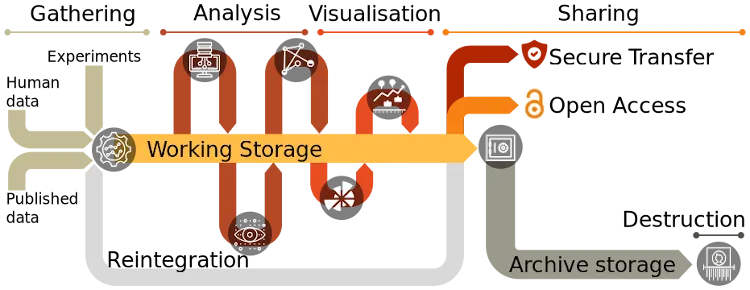
(source)
FYI, in the future, we plan to request a DMP for each project request.
Project lifecycle
Section titled “Project lifecycle”Each project is associated with an expiration date, chosen by the project owner when the project is created. This date can be postponed at any time from the Account Manager.
Notifications
Section titled “Notifications”When the expiration date of a project approaches, its owner receives an email notification 60 days, 15 days, then 3 days before the deadline.
Deactivation
Section titled “Deactivation”Once a project reaches its expiration date, it is automatically deactivated:
- access to the project folder is cut off for all the members of the project;
- the SLURM account associated with the project is removed (no job can be submitted on this account anymore).
Retention and definitive deletion
Section titled “Retention and definitive deletion”6 months after its expiration, the project is automatically and permanently deleted from our infrastructure, including all the data it contains.
During the retention period (between deactivation and definitive deletion), you can still change the expiration date of the project: it will then be automatically reactivated within 24 hours at most.
A good project name
Section titled “A good project name”The ideal name for a project is its ANR acronyme. But you can compose with:
- the species
- the response being studied
- the technologies or methods involved
The ideal name isn’t too long :)
Avoid:
- your name
- the name of your laboratory or team
- anything not relevant to your study
Slurm accounts and projects
Section titled “Slurm accounts and projects”Each project hosted on the cluster is associated with a SLURM account. The SLURM accounts match the project names.
NOTE that to submit jobs through SLURM you need at least one SLURM account, either the “demo” account or your own account.
Your user name is by default associated with the “demo” SLURM account which is limited to 6 computing hours. You need to request the creation of your own project to have more computing hours.
All your SLURM jobs will be accounted on your default account unless you specify a different account.
The -A or --account option in srun or sbatch lets you specify which account you want to use.
srun -A myproject1 hostnamesbatch -A myproject2 awesome_script.shTo view which is your default account using the sacctmgr command:
sacctmgr show user <your-login> format=User,DefaultAccountYou can change your default account using the sacctmgr command :
sacctmgr update user <your-login> set defaultaccount=<project-name>